Case Study: Program Pathways Mapper
Making education and career choices easier for 2.1 million California students
with a white-label SaaS product for participating colleges.

At a Glance
We led an end-to-end redesign of the student-facing PPM, building on the foundation established in previous versions. The tool maps California community college programs and courses to partner-school programs, helping students understand how credits can transfer between institutions and make more informed decisions about their educational pathways.
Read on to see how we made this possible.
- Task Completion Improvement
- 39% → 89%
- Participating Colleges (CCC, CSU, UC)
- 70+
- From Discovery to Market-Ready
- ~12 mo.
How is PPM helping students?
Our client, the Foundation for California Community Colleges (FoundationCCC) — the official nonprofit partner to the California Community Colleges — is committed to reducing barriers to opportunity, accelerating student success, and helping students achieve their educational and career goals. To further that mission, FoundationCCC partnered with Creative Nights to evolve and optimize the Program Pathways Mapper (PPM), one of the system’s key student-centered tools.
- Before the original PPM (Version 1), many students earned credits that didn’t apply toward a degree, resulting in longer completion times and higher costs. There was also ambiguity around upper-division options after completing a lower-division degree or certificate. Nontraditional pathways — including dual enrollment, prior learning, and noncredit-to-credit transitions — also remained underused, especially where workforce mobility matters most.
- PPM Version 1 was created to address these challenges. It established the core features and enabled counselors and college staff to manage and organize pathways, providing students with accurate information about their options.
- Version 2 was built on that foundation, with a focus on further optimizing the student experience. The result? Student task success rose from 39% to 89% — 11 points above the 78% industry average — while the redesign also achieved a 100/100/100/100 Google Lighthouse score and full WCAG 2.2 compliance.
Live Implementations
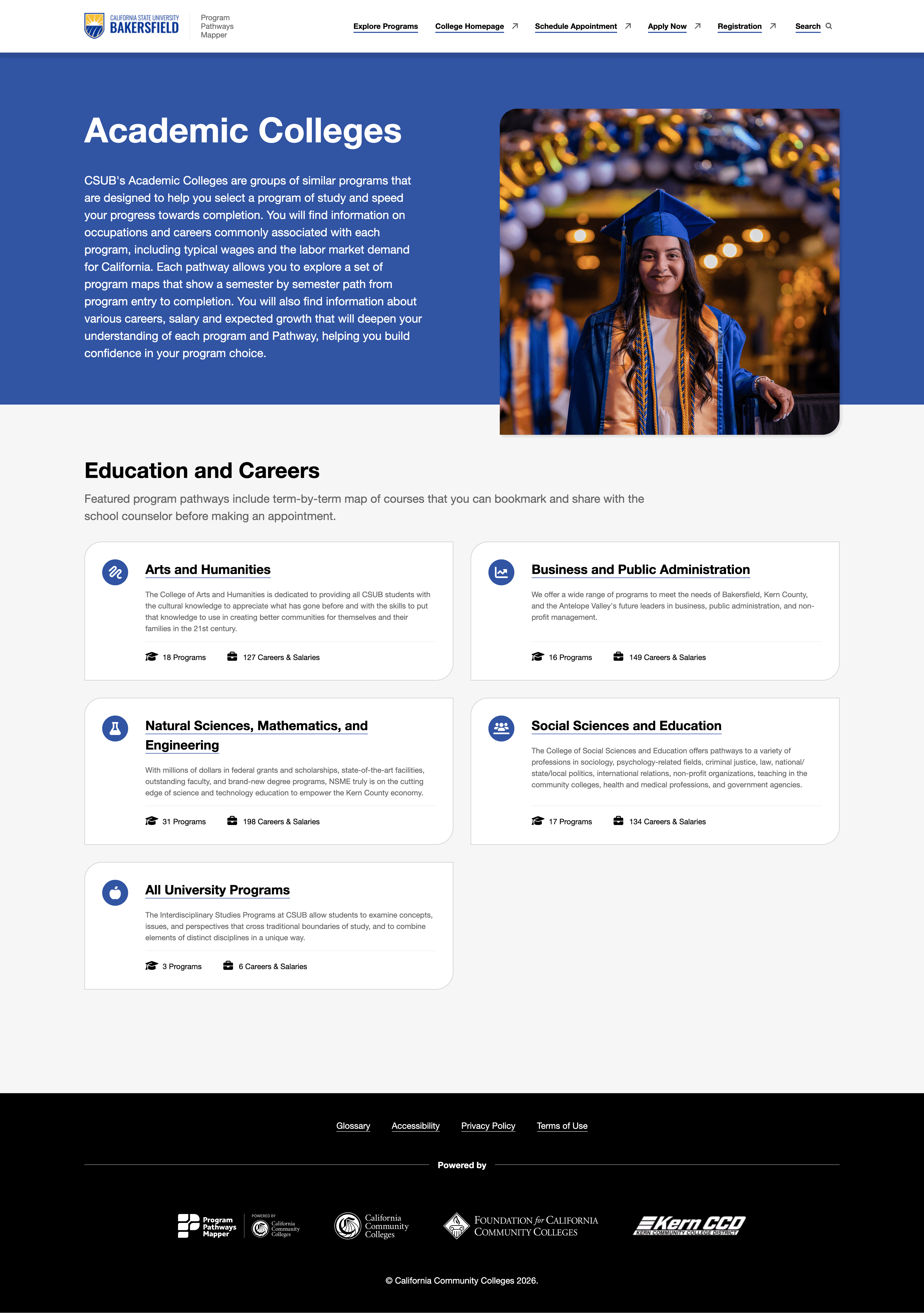
Featured examples of schools utilizing PPM. As you browse, notice the loading speed and brand customization options:
See a full list of 70+ participating schools at programmapper.org.
What We Focused On
Beyond enhancing the student experience, PPM also needed technical updates to support new data models, additional screen sizes, and other upcoming requirements. As is typical of a project of this complexity, there were multiple competing priorities.
To focus our efforts where they could have the greatest impact, we conducted pre-redesign UX research as part of a broader discovery process. The research revealed three key findings that guided our design and technology decisions:
- The experience worked better for experts than students.
- Counselor task success was 57%, compared with 39% for students — well below the 78% industry average. Over time, the experience had naturally evolved around the needs and workflows of expert users rather than students. With the data and core features in place, PPM was well positioned for further student experience optimization.
- The fundamentals were ready for the next iteration.
- A planned roadmap of advanced features presented an opportunity to first strengthen the underlying usability and information architecture, making them ready for future enhancements. We made core interactions more robust while evolving the application architecture to be more scalable and adaptable.
- Underserved student groups experienced a greater impact from complexity.
- Terminology, mental models, and layout complexity often required institutional knowledge and higher education expertise that some audiences, particularly underserved students, were less likely to have. This presented an opportunity to make the experience more intuitive, inclusive, and accessible for a broader range of students.
These findings helped us prioritize our efforts. Rather than simply adding new capabilities, we optimized the experience and its functional foundation so that upcoming features could add value without compounding usability and technical challenges.
How We Approached It
Creative Nights led the work end-to-end: UX research, UI design, full-stack web development, AWS infrastructure, and performance, security, and accessibility optimization. However, beyond a list of services, a few approach highlights worth mentioning defined the end-result:
- Repeatable mixed-method research
- Proxy-server architecture over client-side app
- Multi-tenant front-end, decoupled from the backend
- Quality and compliance
Continue reading about each highlight in the sections below.


A Repeatable, Mixed-Method Research
We designed a research study that could be re-run as the product evolved. We established baseline usability metrics, tested the existing product against them, then tested again after the redesign using the same research study. The change from 39% to 89% task completion success rate was measured using the very same methods.
Most product organizations measure usability once, fix identified problems, and never re-measure. Embedding a repeatable study turned product experience into something the product management team could continue to measure over time.
Proxy-Server Architecture Over a Client-Side App
The single strongest technical recommendation we made was moving PPM from a client-side app talking directly to APIs to a proxy-server architecture, where the browser talks only to PPM’s server and the server talks to the APIs.
Proxy-server architecture wasn’t a tech stack preference, but a decision for optimizing a multi-tenant public-sector product potentially handling student data across many institutions, and addressing several requirements:
- API access protection. Keys and endpoints stay server-side and can’t be read from the browser and abused.
- Rate-limit and cost containment. The server controls call patterns and it’s easier for the API server to throttle traffic from a single consumer if it needs to.
- Data exposure surface. The browser only ever sees the data it needs for each respective screen. Internal fields, IDs, and structures are not exposed.
- Web performance. Server-side composition lets us better control caching and send leaner responses to the browser instead of asking the client to assemble views from several API calls.
- Accessibility compliance. When semantic structure and assistive technology features are rendered on the server, it’s easier to address any problems and stay compliant. Client-heavy apps that process API to compose UI on the fly are more difficult to optimize than vanilla HTML.
A Multi-Tenant Front-End, Decoupled from the Backend
One web UI serves every institution, but each school configures its own logo, color palette, typography, photography, iconography, and content. The PPM application is the “head” for a headless program management system and is completely backend-agnostic.
A couple of practical features:
- A single front-end can cache shared resources such as branding elements and pathway information from different tenant schools, resulting in the partner school’s faster page loading.
- Every URL is unique and bookmarkable. The query string updates as users change filters and selections, so links can be shared between students and counselors and they always land on the same view for every school.
- New institutions onboard to the same codebase, which means improvements ship to everyone simultaneously. After deployment, compared to optimizations, new features are not enabled by default. Schools need to opt-in via their control panel, effectivelly leaving each school in control of how they want to roll-out new features.
Quality and Compliance
Since PPM is a white-label product offered to higher education institutions, it must meet strict accessibility, performance, and security requirements defined by end-customer IT procurement.
- 100/100/100/100 Google Lighthouse score for performance, accessibility, best practices, and SEO.
- WCAG 2.2 compliant, manually validated with assistive technology.
- Strict Content Security Policy, SAST and DAST audited.
- AWS infrastructure including EC2, S3, ElastiCache, ElasticSearch, SQS, Secrets Manager, and CloudWatch.
What Changed for Students
We measured the same tasks, the same way, before and after. (As mentioned before, the overall student task success rate was increased from 39% to 89%.)
In addition to improved user experience:
- Finding salary and career information related to an educational program is more clear and flexible.
- Programs can be filtered by degrees, certificates, location, and duration — categories most students prefer over college internal classifications.
- Students can learn how to complete programs in milestones, completing valuable certificates on their way to a full degree, which opens up possibilities for faster career progression.
To provide workarounds for challenges students face related to active college and system policies, we updated the information architecture and overall findability to better match students’ mental models.
Strategic Takeaways
- Fundamentals beat features in almost every diverse audience product. There is always a temptation to ship visible new features, but the ROI on fixing the things users already try to do is almost always higher.
- Designing for the least experienced population lifts everyone. We optimized for underrepresented students, but the redesign improved task success across every cohort. Optimizing for the power user is a much smaller win, because the power user was already getting around any navigation, communication, and interface obstacles.
- Multi-tenant vs single-tenant is a governance (instead of technical) decision. One codebase for many institutions only works if there’s a clear specification about what each tenant can configure, what’s shared, and how any update propagates.
- In a regulated industry procurement, a secure and accessible product has competitive advantage. However, many products are retrofitted once procurement asks for certifications. It is far cheaper to build with accessibility, performance, and security from the start.
Services Delivered
- User experience research and design — IA, UI, Search Experience
- Web application development — Apache, PHP, JSON, HTML, CSS, JavaScript
- AWS cloud infrastructure design and implementation — EC2, S3, ElastiCache, ElasticSearch, SQS, Secrets Manager, CloudWatch
- Performance, security, and accessibility optimization
Working With Us
Creative Nights takes on a small number of long-term engagements each year so that each one gets the principal-level attention it needs from discovery through optimization.
If you are navigating complex data, diverse audiences, or regulated constraints — or you know someone who is — we would like to connect.